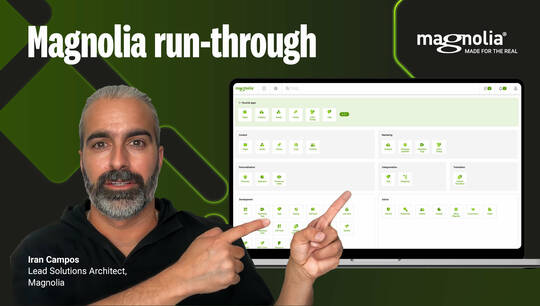
Magnolia Hands on Demo – 1 Walkthrough
5,590 views
- How easy and intuitive is the Magnolia UI
- How you can search the full content repository of Magnolia and connected apps
- Roles & security concepts and configuration
View transcript
Hey there. Welcome to the Magnolia Demo founded in 1997 with a vision to create the first truly open content management system. Magnolia is now the world's leading compose herbal digital experience platform, we help clients succeed by giving them the flexibility they need to make truly differentiated customer experiences. Thanks to our open architecture and headless approach that works for developers and marketers alike. Magnolia is now the DXP of choice for a new wave of companies. Our customers know they can trust us to help them stay ahead of the pack, get ready to discover what magnolia can do for you. Hello and welcome to our walkthrough of Magnolia. Let's go first of all, I'm going to lock in as a normal content editor and what we see here, that's the Magnolia Edmond Central. Basically what we have here based on the actual role that we have is a collection of different apps that we need to work with the system. For example, the pages app, we will work with pages. Visual signage is where we can work on content for our digital science systems Mobile. If we have a native mobile app, then this is where we can work for on content for this mobile app. Down here, we have apps for assets, all our documents and images as well as a few apps. Power content pool. One of the really amazing things of that app concept is that once you understand one app and Magnolia, you understand every single app in the system simply because the general structure is always the same. So if I go here to the pages F and always on the left hand side. This is where our content lives in this case. Because the nature of the content is apps. As pages we see here then all the different pages for each and every single side and on the right hand side we have the extra bar. So the action bar that's really like the remote on your T. V. Those are all the actions that you need to basically interact with that content. For example with that page I can create a new page, I can publish pages all of them for zero translation processes and so on. And as we're going to see later on that structure, is that completely identical? Therefore the learning curve is extremely fast. Another thing because we have so many specialist apps for the different use cases that we have at hand. It's very important that we find the right content and for that we have here our search bar. And with the search bar I can basically search the full content repository of magnolia. So for example if I go here for above then we just basically get here everything with bathroom from pages from assets from categories and so on on top of this for search we have here this faceted search that means that I can even start to narrow down my search based for example on the time period edited on who was the last editor on how is that content classified? All right. Now that we have a good understanding for how the core principles of magnolia work. We are ready to have a look on more advanced topics. Let's speak about security and rights and roles in magnolia for that. I'm going to lock in as an administrator. Okay. What we've seen already is the account that I use actually determining what kind of functionality is available for me. And that's not only true for the apps in general. The same thing goes also for the different actions that I have. That means based on the actual role that I have, I can trigger certain actions or for example, um, you could just say that someone is not able to delete a page, not able to move a page, not to personalize content and so on. Each and every aspect can be basically configured based on a roll. Um, let's talk a little bit more about those roles in detail because it's not only about available apps and the action bar, it's also about what kind of content is available for me. What kind of content can be edited by me. What kind of content is just totally hidden for me for that. You guess it we have an app. Um, so for that we have the securities up. Very important. The heart of it all is just this very classical combination. Very old enterprise pattern. We have various roads and all those roles are basically combined into groups and typically those groups are then applied to different users. Let's have a look on those roles. So I'm just going to take a random role to explain the concept behind it. So let's go here for our it was just a random role. two things here are extremely important. The excess. So with that access you can specify what kind of rest and points and what kind of um, even from magnolia or from the website itself, what can be really accessed. So here in this web access you can just configure for get post what kind of us rest and point can be actually accessed. That's one part. But what about the content? This is what we see here in the excess control list because each and every app that we have seen is coming with its own workspace. So the web page has its own workspace assets, campaigns and so on. Everything comes with an own workspace. And what you can do is you can down to the note down to the acid onto the page, specify what kind of content can be edited, deleted or should be, should be even seen. So let's say for this um, editor role here, we want to have a access to the website. So here can decide for example choose that user has four read and write access to the full home website. So safe changes, but on top officers, he has only read only access to the let's say spanish website and obviously the same thing goes for assets and so on in a nutshell based on this fine granular concept of rights and roles. It's very easy also to come up with an almost multi tenant like scenario where just have multiple sites and you have dedicated country editors that only let's see their own content or their own campaigns. And as you can guess, this is going to help you a lot too cut and slice the roads an optimal way for security and for efficiency. All right. So much for rights and roles in magnolia. Let's go a little bit deeper. Um, let's talk about something that we call the filter chain and it's really important to understand why magnolia is as secure as it is. If you think about magnolia might be just the editing instance where we have just worked all the time or also on the life instances that are going to deliver the content no matter what kind of instance you're going to communicate with. There's only one way and only one way to access the system and that is basically the magnolia filtered chain. So this will be the only entry to talk to the system. And if we have a quick look on the filter chain, how it works that we have here, the filter chain just to explain a little bit more. Each and every single request has to tickle down through that filter chain and therefore there's also no way to basically bypass, let's say security for lock in. There's no way to pedal with CSR F Security and so on. This is really one of the main reasons why magnolia is as stable as it is and that's also one of the reasons why it's um rather simple to also integrate um external authentication systems. I mean sure we just come with all the tricks of the trade for um off and so on as you can guess. But let's say you have some kind of um custom developed security solution. It's very simple to integrate that into Magnolia because you can just go to the lock in section and then on the lock and handlers you could then even write your own filter to integrate your own security solution. Alright. And that concludes our quick overview on rights, roles and security and magnolia. Thank you and see you in the next one. Yeah.